Loading posts...
Loading comics...
Commission information
Payment: PayPal only.
Deposit: A 50% upfront payment is required before work begins.
By submitting a commission request, you agree to these Terms of Service.
Loading commission types...
What Narrator can do
- Character profiles
- Keep character identities, biographies, and profile cards together, with ownership and character selection.
- Speak in character
- Use
/sayto send a message as your selected character, with an optional image or reply. - Points & progression
- User and character wallets, levels, leaderboards, shop upgrades, and role shop items.
- Server controls
- An admin setup panel, logging, and separately configurable user and character level-up alerts.
Getting started
Follow Narrator's six-step guide below, or run /tutorial in Discord to follow along with the bot.
-
Create your first character
Run
/character create-and-assignand fill in at leastidandname. Your new character is assigned to you immediately.Use
/character listto confirm the assignment, or/lookup character:<id>to check who owns a character. -
Pick the character you want to speak as
Run
/character pick character:<id>. You can switch characters anytime by running/character pickagain.Not sure who owns a character? Use
/lookup. -
Start roleplaying with /say
Run
/say message:<text>to speak as your picked character. You can also addimage,reply_to, andpingoptions. Pings are on by default.Fix a typo with
/say-edit message_id:<id> message:<text>. You earn points through normal chat and/say. -
Use wallets and upgrades
Check user and character balances with
/wallet. Visit/shopfor slot and character upgrades, and track your progress with/pointsand/leaderboard. -
View and customize your character
Use
/character profileto view your card. Open/character editto change your biography, personality, backstory, card style, accent color, or selected title.Premium users can also set a custom card background image.
-
Inventory, items, and titles
Use
/inventoryto check items and carry weight,/use-itemto consume an item,/gift-itemto give one away, and/trade proposeto start a trade.Buy titles in
/shopand select them through/character edit. Titles belong to your user, so you can use a purchased title on any of your characters.
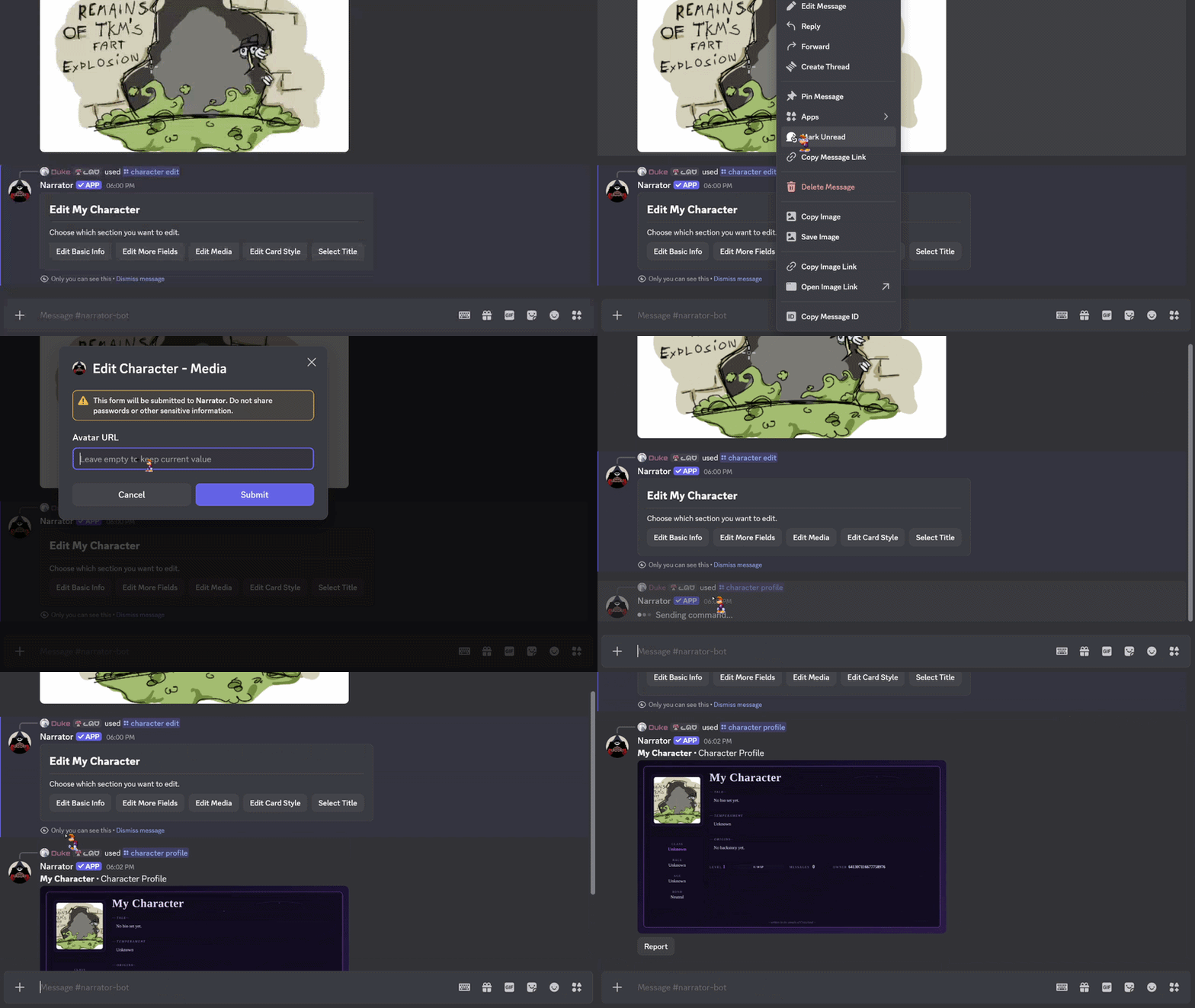
How to get an image URL from Discord
Need a profile picture or an image for another field? This tutorial shows how to copy an image's URL from Discord and use it in Narrator.